

Webhooks
Introduction
Webhooks are a powerful tool that enables real-time updates to your integration. By subscribing to specific events, you can receive HTTP POST requests containing relevant data whenever these events occur. This allows you to automate responses and streamline your processes, reducing manual intervention and improving overall efficiency.
Managing Webhooks
Our platform provides a user-friendly visual interface to manage your webhook subscriptions. To set up and monitor your webhooks:
- Navigate to Settings by clicking on the gear icon in the top right corner of the navigation bar.

- In the Settings menu, locate the API section in the bottom left corner and click on the Subscriptions tab.
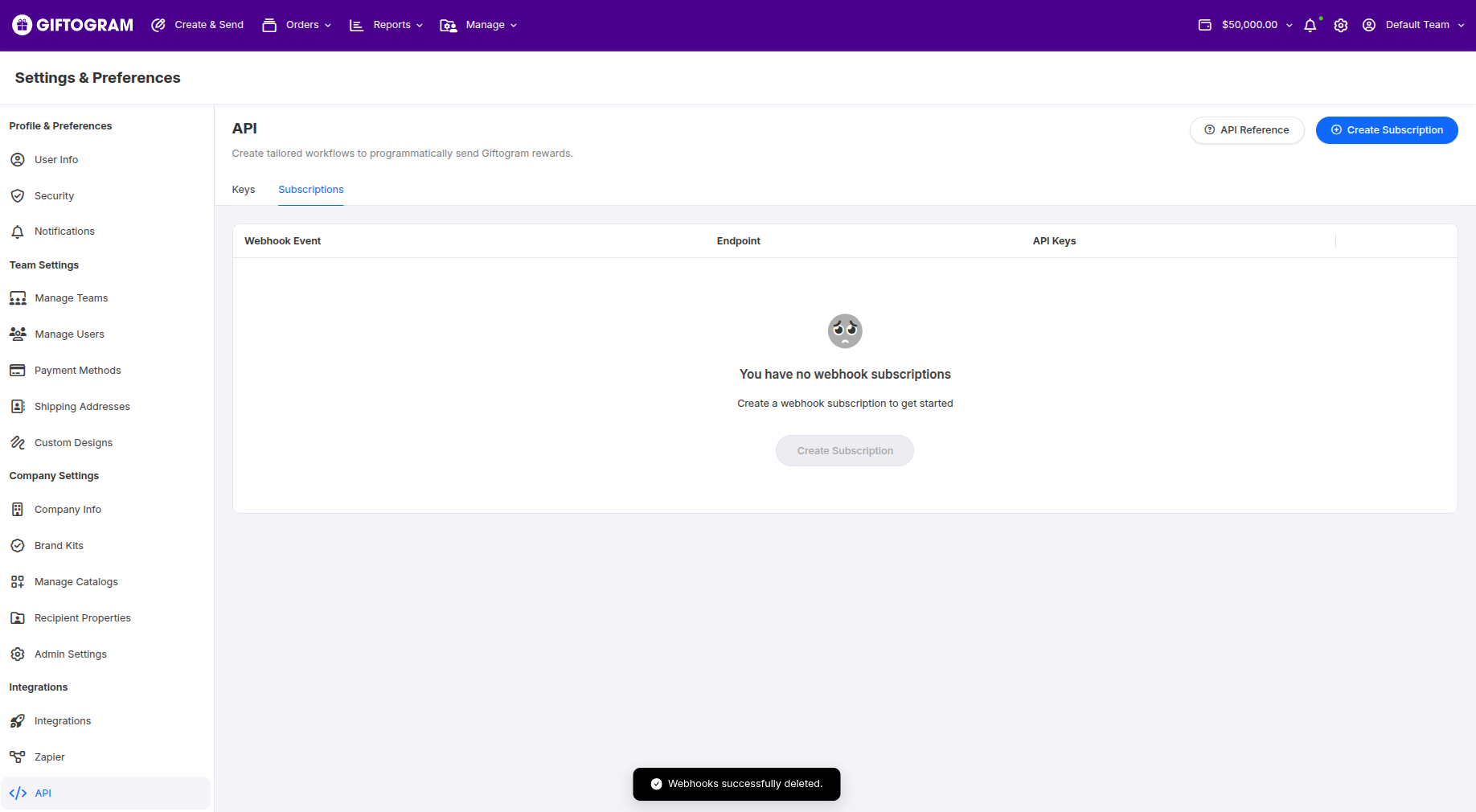
- Click on the Create a Subscription button to create a new webhook subscription.
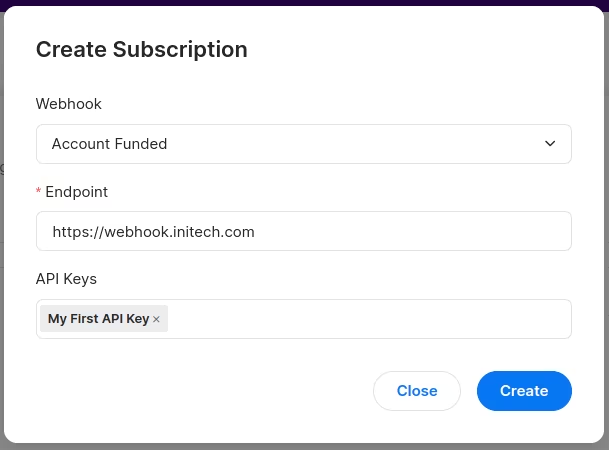
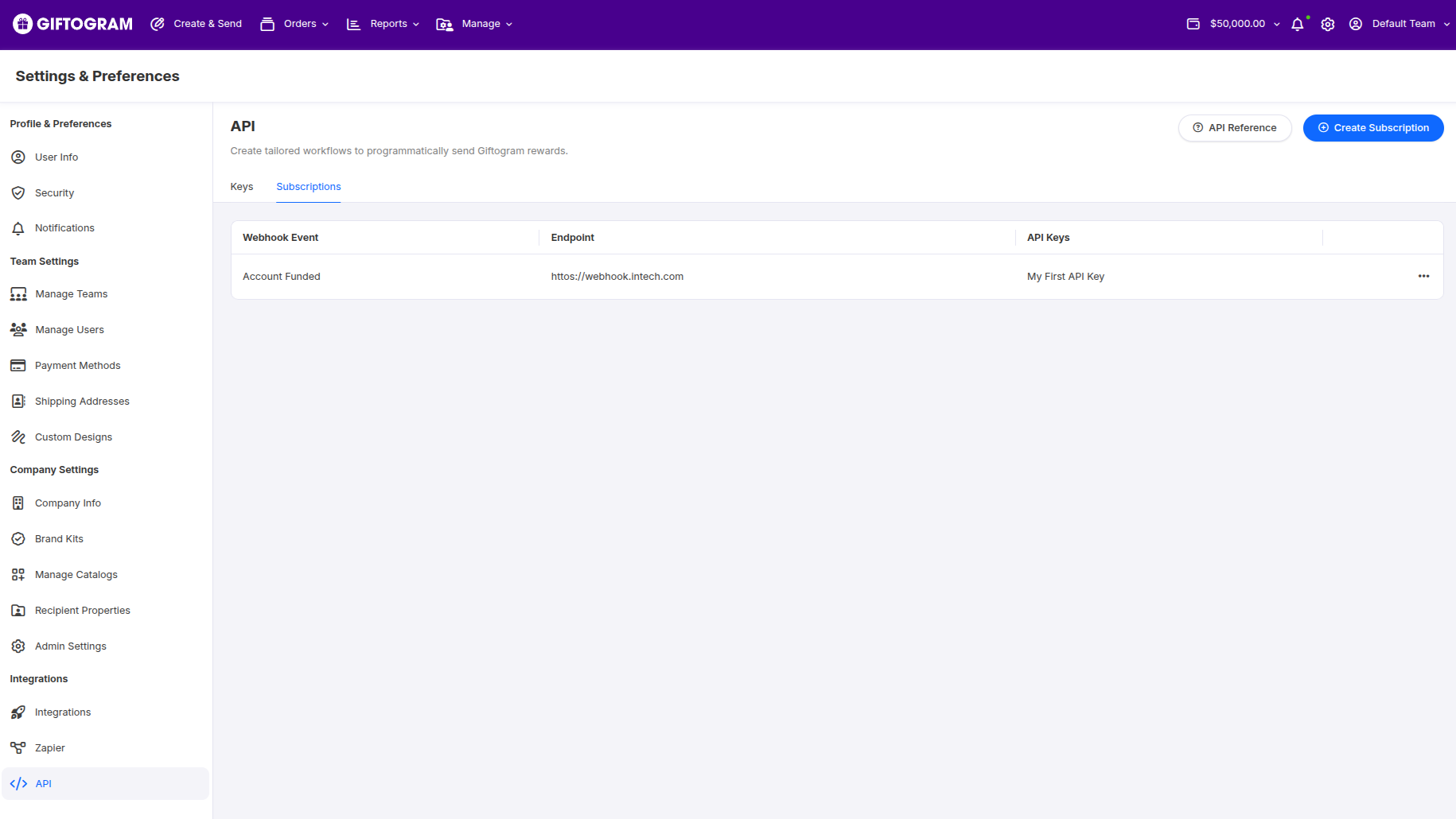
- Fill in the required details, such as the event type and the URL where you want to receive the webhook notifications. Once you've provided the necessary information, click on the Create button. Your new subscription will now be listed in the Subscriptions tab.
NotePlease note that webhooks cannot currently be managed via the API and must be set up through the Giftogram application platform.
Supported Webhook Events
Our platform currently supports the following webhook events:
| Webhook | Description |
|---|---|
| order.created | Triggered when a new order is successfully initiated on the platform. Includes pertinent information such as created date, order details, and associated customer or recipient details. |
| order.status.updated | Triggered when the status of a sent Giftogram email changes. Supported status changes include: sent, delivered, and bounced.-Sent: When the email has been sent out.-Delivered: When a delivery receipt is returned from the receiving mail server.-Bounced: When a bounce receipt is returned from the receiving mail server. Bounced gifts are refunded automatically. |
| campaign.created | Fired when a new campaign is created in the system. Provides important details such as campaign name, ID, funding information, creation date, creator, and more. |
| campaign.deleted | Activated when an existing campaign is deleted from the system. Sends information such as the ID of the campaign that was removed and the time of deletion. |
| account.funded | Triggered when funds are added to your platform account. Notes amount added for the relevant account. |
| team.funded | Triggered when a team-funded wallet’s available balance increases. Includes the team ID, currency, and new available balance—not the amount added. |
Example Payloads
Giftogram sends webhook notifications as HTTP POST requests with a JSON body. The event field identifies the notification type.
The identifiers and amounts below are examples. Payloads are sent directly, without a data wrapper.
order.created
Notifies your integration that an order has been created. This does not mean its gifts have been delivered.
{
  "order_id": "b8ce3012-145d-4f79-8bc2-b984af60ed39",
  "external_id": "customer-order-12345",
  "total": "100.00000",
  "currency": "USD",
  "event": "order.created"
}order_id: Giftogram's order UUID.external_id: The identifier your integration supplied when creating the order.total: The order total, represented as a decimal string in the paying wallet's currency.currency: The currency oftotal.
order.status.updated
Reports a delivery-status change for an individual recipient. An order with multiple recipients can produce several notifications with the same order_id.
{
  "order_id": "b8ce3012-145d-4f79-8bc2-b984af60ed39",
  "external_id": "customer-order-12345",
  "campaign_id": "f3f940c3-0281-448d-886d-4969b3596826",
  "status": "delivered",
  "email": "[email protected]",
  "event": "order.status.updated"
}| Status | Meaning |
|---|---|
sent | The gift notification has been sent. |
delivered | The receiving email server reported delivery. This does not confirm that the recipient opened or redeemed the gift. |
bounced | The email could not be delivered. |
campaign_id identifies the campaign, and email identifies the recipient associated with the update.
campaign.created
Reports the creation of a legacy API campaign.
{
  "id": "f3f940c3-0281-448d-886d-4969b3596826",
  "name": "Employee Recognition",
  "event": "campaign.created"
}
id is the campaign UUID. These campaign notifications apply to legacy API campaigns, rather than the standard campaigns used by v2.
campaign.deleted
Reports the deletion of a legacy API campaign.
{
  "id": "f3f940c3-0281-448d-886d-4969b3596826",
  "name": "Employee Recognition",
  "event": "campaign.deleted"
}
account.funded
Reports an increase in an account-funded wallet's available balance.
{
  "credit_available": 1250.50,
  "currency": "USD",
  "event": "account.funded"
}
credit_available is the new available balance, represented as a JSON number in the specified currency. It is not the amount added.
team.funded
Reports an increase in a team-funded wallet's available balance.
{
  "team_id": 123,
  "credit_available": 1250.50,
  "currency": "USD",
  "event": "team.funded"
}
team_id is the numeric identifier of the funded team. As with account.funded, credit_available is the new available balance.
Funding notifications are dispatched after the transaction commits. They do not report balance decreases caused by orders.
Delivery and Retries
Your endpoint should return an HTTP 2xx response after accepting the notification. Each delivery attempt has a 3-second timeout.
Giftogram retries failed deliveries, including non-2xx responses, connection errors, and timeouts:
| Attempt | Timing |
|---|---|
| Initial delivery | When the notification is processed |
| First retry | 10 seconds after the initial failure |
| Final retry | 100 seconds after the previous failure |
There are three delivery attempts in total. Queue delays and request duration can make delivery later. Automatic retries stop after the final failure.
Verify the signature before accepting a notification. If processing takes longer, durably save or queue the notification and return 2xx promptly.
Your endpoint may receive the same notification more than once. Handle repeated deliveries without repeating business actions. Do not use order_id alone to discard duplicates: different recipients and status changes can share the same order ID.Triggered when a team-funded wallet’s available balance increases. Includes the team ID, currency, and new available balance—not the amount added.
Security Considerations
NoteTo ensure the security of your webhook data, it is strongly recommended that you use HTTPS-secured endpoints to receive webhook notifications. This helps protect sensitive information transmitted between our platform and your system.
By leveraging webhooks, you can create a more responsive and automated integration with our platform. Stay informed about important events and take immediate action based on the real-time notifications delivered to your designated endpoints.
Updated 15 days ago